

Help Us Stay Connected!

As a valued member of Philadelphia Romanian Church, we want to ensure that you stay informed about the latest updates, news, and events. To do this, we need your help! Please take a minute to update your contact information with us. This will enable us to keep you in the loop via email and ensure that we have the most up-to-date details on file.

Your Help is Appreciated!

To update your information will help us to:

  • Keep you informed about upcoming events and important announcements
  • Ensure that you receive our newsletters and other communications
  • Update our records with your latest contact details

To update your information, simply click the button below to access our quick and easy update form.
Add a Photo to your Profile (Mobile)

ON THE MOBILE APP (IOS OR ANDROID):

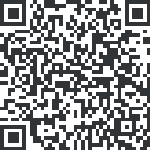
  1. Download and Install Church Center by scanning the QR below.
  2. Login with your cell phone number.
  3. Tap your profile icon in the top-right corner.
  4. Tap My Profile & Settings to view your profile.
  5. Tap Contact and Profile Information
  6. Tap Update Photo to select a new photo
  7. Choose Take Photo or Choose from Library.
  8. Select your photo, adjust if needed, and Save.

Scan QR Code to download Church Center application.

Add a Photo to your Profile (Web)

ON THE WEB (BROWSER):

  1. Go to https://philadelphiaro.churchcenter.com/ and log in to your account with your cell phone number.
  2. Login with your cell phone number.
  3. Click on My profile & Settings
  4. Hover over the existing profile picture and click Upload Photo and select the image from your device and upload it.
  5. Adjust the crop if prompted, then save.